EvSolver guide
Everything you need to know to use EvSolver, step by step.
1What EvSolver does
You tell EvSolver which Pokémon you are building and what it has to achieve (survive this attack, outspeed that Pokémon, knock this one out). It then searches every nature and every allowed investment of Stat Points (SP) or EVs and gives you the cheapest spread that satisfies everything at once, plus the alternatives worth knowing about.
Damage is calculated with the same engine used by the Smogon damage calculator (@smogon/calc), extended with items, abilities and Pokémon Champions mechanics. Everything runs in your browser: there is no account and no server that receives your teams.
1.1Two stat systems
| SPs (Pokémon Champions) | EVs (main games) | |
|---|---|---|
| Budget | 66 in total | 508 in total |
| Cap per stat | 32 | 252 |
| Step | 1 SP = +1 stat point | 8 EVs = +1 stat point |
| IVs / level | fixed: 31 and 50 | IVs 31, level 50 by default |
| Tera | not available | available |
You switch between them with the SPs / EVs selector in the header. In SP mode, 1 SP is exactly 8 EVs, which is why the same benchmark is reached with the same stats in both systems.
1.2The idea in one minute
- Put your Pokémon on the left (paste a Showdown set or fill the fields).
- Add constraints on the right: Defense (what it must survive), Attack (what it must knock out) and Speed (who it must outspeed).
- Press Calculate.
- Read the recommended spread, compare the alternatives and copy the paste into Showdown, or download the PDF report.
2Quick start
This is the whole screen. Each number below matches a marker on the image.
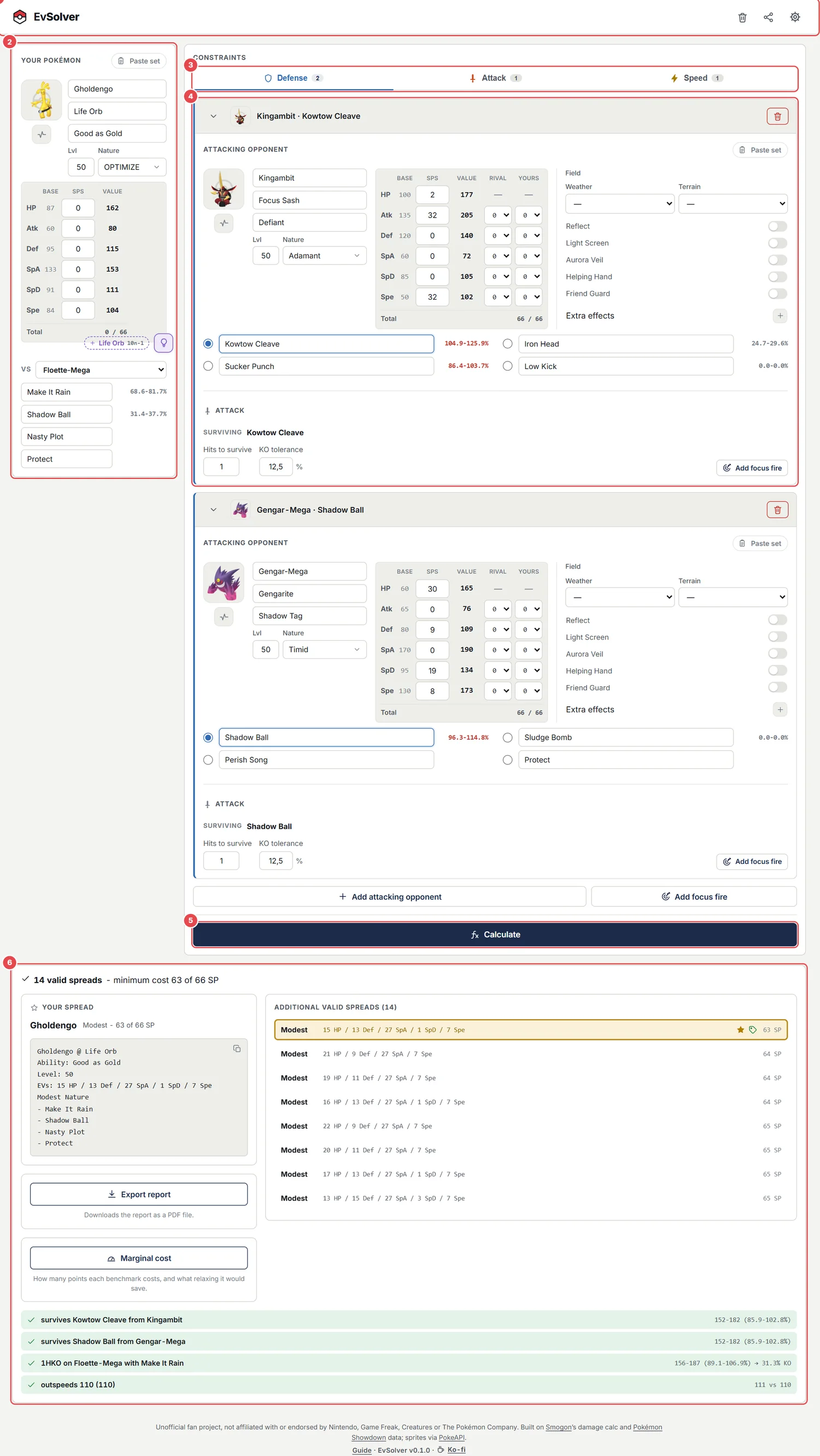
- Header: clear, share and settings (format, stat system, theme, history).
- Your Pokémon: the set you are building.
- Constraint tabs: Defense, Attack and Speed.
- Constraint cards: one per benchmark; you can have as many as you need.
- Calculate: runs the search.
- Results: the spread, the alternatives and how each benchmark is met.
- Paste or type your Pokémon on the left. Leave the nature on OPTIMIZE so that EvSolver chooses it.
- Open the Defense tab, paste the attacker you want to survive and click the circle next to the move that hits you.
- Optional: add an Attack constraint (a Pokémon you want to knock out) and a Speed constraint (a Pokémon to outspeed).
- Press Calculate.
- Click the spread you like in the list and click the paste box to copy it.
Everything you type is saved in your browser, so you can close the page and come back later. The format (Singles/Doubles) and the stat system (SPs/EVs) start at their defaults on every visit on purpose.
3The header

- Clear: empties your Pokémon and all the constraints to start a new calculation (format, stat system and theme are kept). It asks for confirmation first, and afterwards a message offers Undo for a few seconds.
- Share: a link that opens exactly what you have (see Sharing a calculation).
- Settings: everything below.
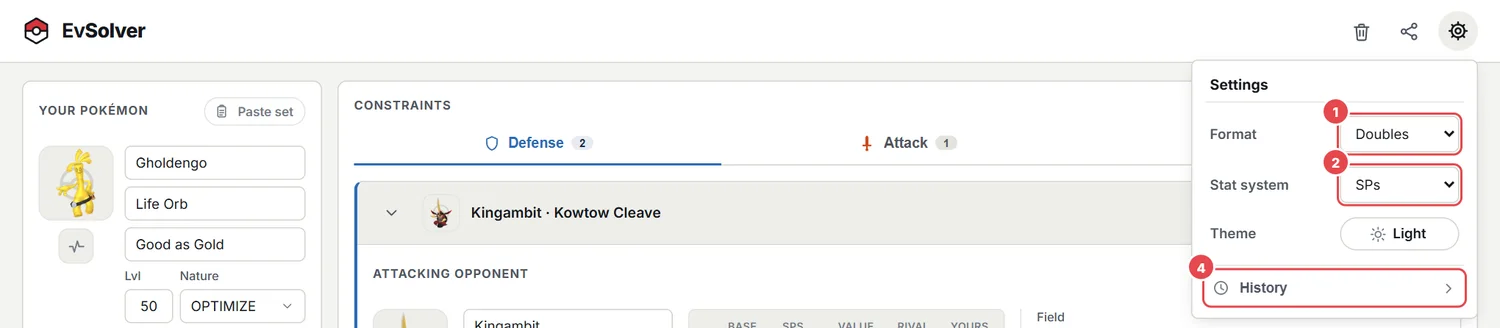
- Format: Doubles (default) or Singles. It changes spread-move damage (the 0.75x reduction), screens and Friend Guard. Every constraint inherits it.
- Stat system: SPs (Champions) or EVs (main games).
- Theme: automatic (follows your system), light or dark; click to cycle. Your choice is remembered.
- History: your last calculations. Click one to compare it with the current spread, or press its Restore icon to bring back that whole Pokémon and its constraints (with Undo, see Results).
Changing the stat system rebuilds the interface (the point caps and totals are different). Values you typed in the other system are not converted, so pick the system first.
4Your Pokémon
The left panel is the Pokémon you are building. The search does not overwrite the SP/EV boxes: they are your input. Any stat where you type a value above 0 is locked: every spread the search returns keeps exactly that investment, and it counts in the total cost. For example, with 32 in Speed all the results have 32 Speed and the search spends the rest of the budget on the other stats. A note above Calculate lists the locked stats ("2 stats locked: HP 4, Spe 32") with an Unlock button that sets them back to 0. Stats left at 0 are free for the search to fill. If you paste a set that already has a spread, that spread is locked too: clear the boxes (or paste the set without EVs) if you want EvSolver to decide everything.
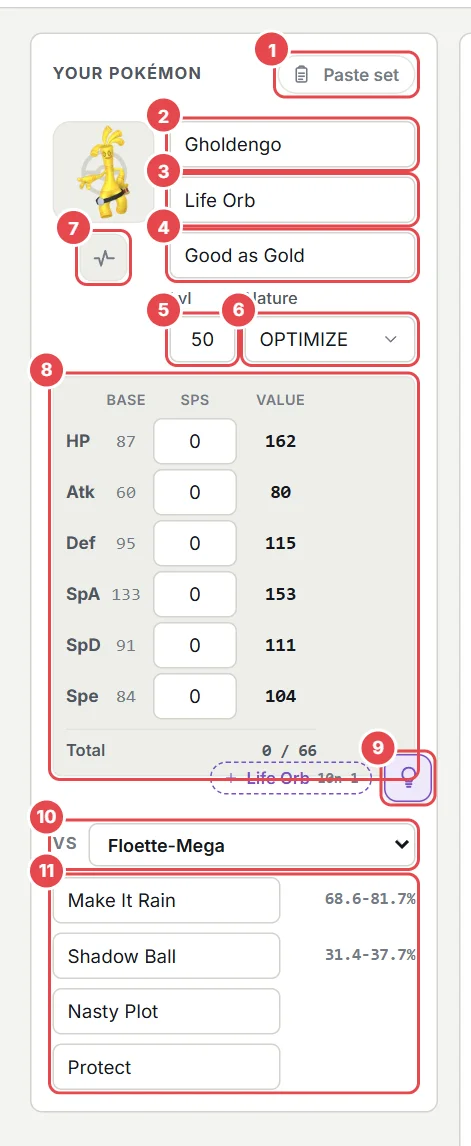
- Paste set: import a Showdown set.
- Species: autocomplete with every Pokémon, including Mega forms.
- Item.
- Ability: suggestions are limited to the abilities of the species.
- Level (50 by default).
- Nature: OPTIMIZE lets the app pick it; or fix one.
- Status and Tera icon menu (Tera only exists in the EV system).
- Stats table: base stat, points invested and the final value.
- HP tuning button.
- vs selector: the rival used for the damage percentages.
- Moves with the damage each one does to the selected rival.
4.1Paste set
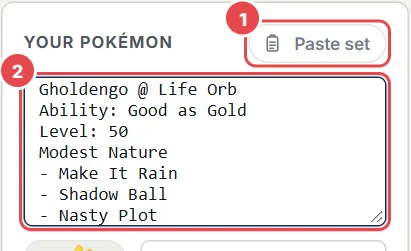
- The Paste set button opens the box.
- Paste a set in the Showdown format: it is loaded as soon as you paste it.
The parser understands the usual Showdown lines: Species @ Item, Ability:, Level:, Tera Type:, EVs: or SPs:, IVs:, Modest Nature and the four - Move lines. Nicknames, genders and unknown lines are ignored. When you open the box, it is pre-filled with your current set, so it also works as a quick exporter.
4.2Species, item and ability: what gets filled in for you
- If the species has one possible ability, it is set automatically. Changing the species clears the item and ability of the previous form.
- Mega Pokémon and forms that need a fixed item (Mega Stones, Primals, Crowned Zacian/Zamazenta...) get their item automatically.
- For the Champions Megas, the game's real ability is applied even if the calculator library lists a placeholder one.
- A move that the species cannot learn (in any game) turns the move box red as a soft warning. It is only a hint: an event or a Champions-only source may still make it legal.
4.3Nature
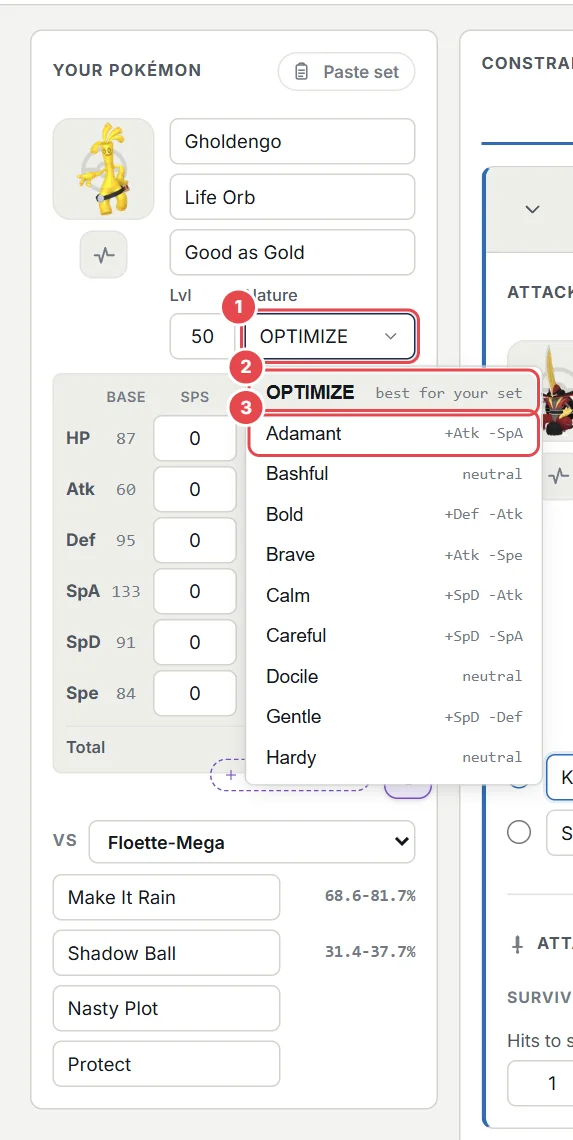
- Nature button: shows the current nature and what it raises and lowers.
- OPTIMIZE: EvSolver tries all 21 natures and recommends the best one for your set.
- Each nature lists what it raises (
+SpA) and lowers (-Atk) in two aligned columns.
- You can type a nature name while the field has the focus:
modestselects Modest at once; if the list is open, it highlights it andEnterconfirms. The arrows move andEsccloses. - Fixing a nature limits the search to it. In the rival and target cards there is no OPTIMIZE: they always have a concrete nature.
4.4Stats table
Each row shows the base stat, the SP/EV box and the final value at level 50 with the current nature. The Total line shows what is spent out of the budget (for example 0 / 66). Values above the cap per stat are corrected when you leave the box.
When the item or ability always multiplies a stat with no field, status or turn to guess (Choice Band/Specs/Scarf, Huge Power, Pure Power, Gorilla Tactics), the value row also shows the effective stat in colour, for example 112 → 336. It also shows on the rival/target cards.
4.5Moves, damage percentages and copying the calc
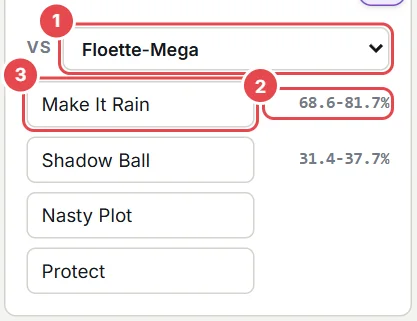
- vs: choose the Pokémon your moves are calculated against. The list has the defenders of your Attack constraints and the attackers of your Defense constraints; by default it is the first Attack target.
- Percentage of the target's HP that the move deals (min-max), with your current spread. Red means it can KO.
- Move name. Status moves show no percentage.
Click any percentage (yours, the rival's, or the one in the Attack section) to copy its full calc text to the clipboard, for example: 32+ SpA Fairy Feather Pixilate Sylveon Hyper Beam vs. 32 HP / 2 SpD Rillaboom: 235-277 (113.5 - 133.8%) -- guaranteed OHKO. In SP mode the text shows your points, and Megas are written as "Mega Floette".
4.6HP tuning
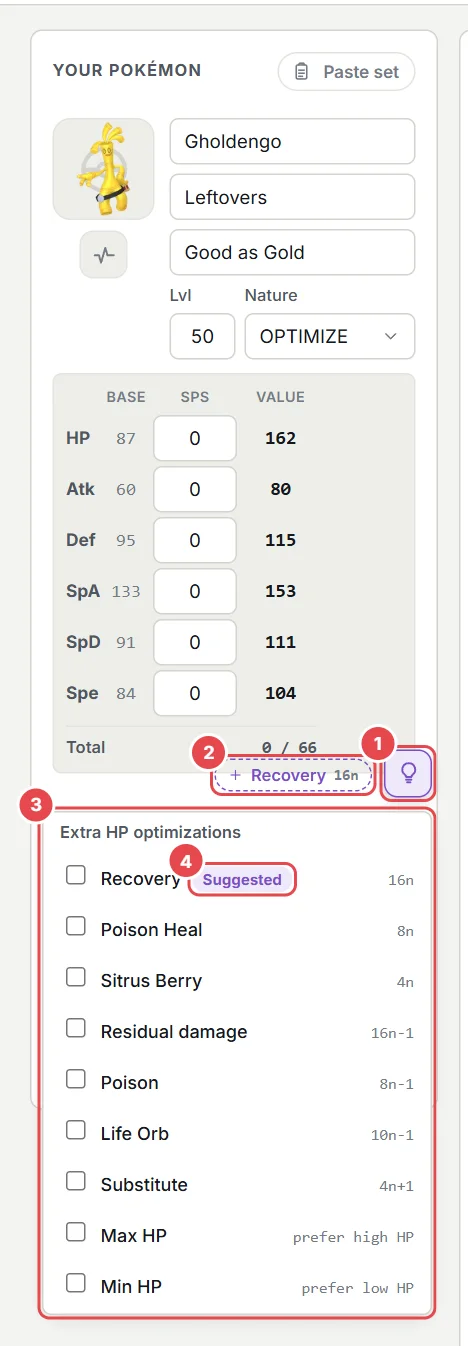
- Bulb button in the bottom-right corner of the stats table. It turns filled when something is active and shows how many.
- Suggestion: if your item or ability matches a mechanic (Leftovers, Sitrus Berry, Life Orb, Poison Heal, Rain Dish...), a dashed chip offers it with one click.
- Menu ("Extra HP optimizations"): tick what your set uses.
- The tag suggested marks the entry that matches your item or ability.
Some items and effects work best at specific HP values. HP tuning makes EvSolver also look for the cheapest spread whose HP wastes the least; that spread appears with a bulb in the results.
| Option | Pattern | Why |
|---|---|---|
| Recovery (Leftovers, Black Sludge, Rain Dish, Ice Body, Grassy Terrain) | 16n | The 1/16 heal loses nothing when HP is a multiple of 16. |
| Poison Heal | 8n | Heals 1/8 each turn. |
| Sitrus Berry | 4n | Heals 1/4 of the max HP. |
| Residual damage (Burn, Sandstorm) | 16n-1 | A floor of 1/16 hurts least at 16n-1. |
| Poison | 8n-1 | Same idea with 1/8. |
| Life Orb | 10n-1 | Its recoil is 1/10 of the max HP. |
| Substitute | 4n+1 | Costs 1/4 of the max HP. |
| Max HP / Min HP | preference | Among the cheap spreads, take the one with the highest / lowest HP. |
Some options can never be satisfied together (for example 16n with 16n-1). EvSolver tells you when that happens instead of returning nothing silently. Max HP and Min HP exclude each other.
5Constraints
A constraint is one thing your Pokémon must achieve. All active constraints must be satisfied at the same time, so each one you add can only make the spread more expensive. Cards can be collapsed with the arrow on their left and deleted with the trash icon; the list is saved as you go.
| Tab | Meaning | Typical use |
|---|---|---|
| Defense | Survive an attack (or several together) | "Survive Flutter Mane's Moonblast", "survive Kingambit + Gengar in the same turn" |
| Attack | Knock out a Pokémon with your move | "2HKO Amoonguss with Knock Off" |
| Speed | Outspeed or stay under a Pokémon or a number | "Outspeed 135", "underspeed 50 (Trick Room)" |
Each card lists the Pokémon on the header line, and the marginal cost button (see Results) tells you what every constraint costs.
6Defense: surviving attacks
Add an attacking opponent, describe it and pick the move that has to be survived.
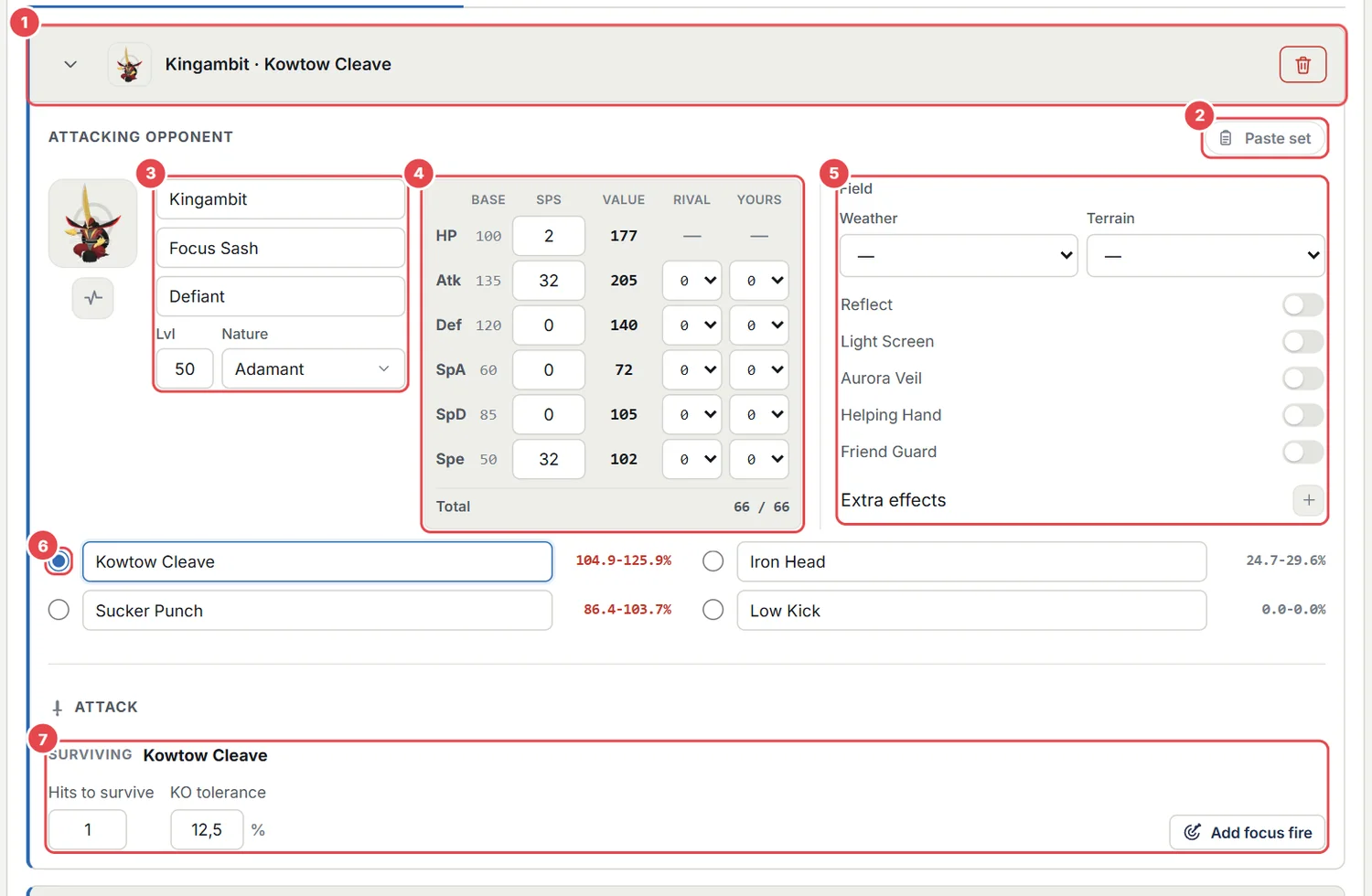
- Header of the card: collapse arrow, sprites and summary, delete button.
- Paste set for the rival (same as for your Pokémon).
- Rival fields: species, item, ability, level, nature, status.
- Rival stats (its own SPs/EVs) with two boost columns: Rival (its stat stages, e.g. -1 Atk after your Intimidate) and Yours (your stages, e.g. -1 Def after Screech).
- Field of this constraint: weather, terrain, screens and Extra effects.
- Circle next to a move: the move you have to survive.
- Details of the chosen move.
6.1Choosing the move to survive
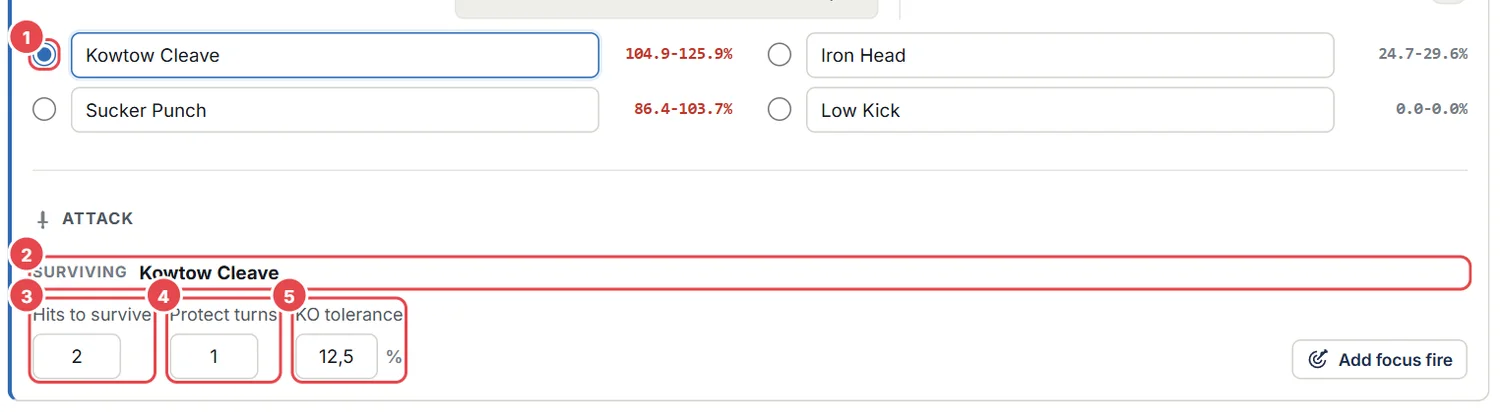
- Circle: select exactly one of the four moves. The selected row is highlighted.
- Surviving: shows the chosen move. If none is chosen, a red hint asks you to pick one.
- Hits to survive: how many times in a row you must take the move.
- Protect turns: appears only when the hits are 2 or more (see below).
- KO tolerance: the chance of dying you accept.
You can edit the four moves freely; if you change the text of the selected one, the constraint follows. The percentage at the right of each move is the damage it does to you with your current spread; click it to copy the calc.
6.2KO tolerance
0 % means that not even the highest damage roll may knock you out. 12.5 % means you accept dying in 1 out of 8 rolls (a common VGC threshold). The higher the tolerance, the cheaper the spread. With 2 or more hits, the tolerance applies to the whole sequence.
6.3Hits to survive and Protect turns
If the attack will hit you more than once, increase Hits to survive. Then the Protect turns box appears: the number of turns you spend behind Protect between the hits. Those turns take no damage but still give your recovery (Leftovers, Grassy Terrain, Poison Heal, Sitrus timing...), which is the situation calculators usually cannot express.
Example: two hits of 55 % on a Pokémon with Leftovers (6 % per turn). Without Protect, 55 - 6 + 55 = 104 %: it faints. With one Protect turn, 55 - 6 - 6 + 55 = 98 %: it survives. The Protect turns are placed right after the first hit.
The same box exists in two more places. In an Attack card it appears once Number of hits is 2 or more: those are the turns the rival spends behind Protect between your hits, so its own recovery (Leftovers, Grassy Terrain...) keeps ticking and the knock out gets harder. In a focus fire it appears once some attacker hits on more than one turn, and it counts the turns behind Protect after the first one.
6.4Variable moves
- Multi-hit moves (Bullet Seed, Triple Axel, Population Bomb...) show a hits selector; Skill Link and similar abilities set the default.
- Variable power (Last Respects, Rage Fist, Fickle Beam...) show a power selector.
- Spread moves (Rock Slide, Earthquake...) in Doubles show Single target: tick it when the move only hits you here (no 0.75x reduction).
The Extra effects menu of the card also has Critical hit: the rival lands a critical hit. Moves that always crit (Wicked Blow, Surging Strikes, Flower Trick, Storm Throw, Frost Breath) already do it without ticking anything.
6.5Focus fire
Focus fire is surviving several attackers in the same turn. Use the Add focus fire button inside a card (or in the bottom bar to create a group with two attackers).

- The first attacker (selected, its details are shown below).
- The second attacker: click a chip to edit it; the small cross removes it.
- + adds another attacker to the group.
- KO tolerance is shared by the whole group ("all attacks together").
- Attack order: who lands first (see below).
- The number on each chip is the order in which its attack lands.
The damage of all the attackers is added roll by roll, exactly like the KO chance calculators players use, and there is no recovery between them because they all happen in the same turn.
The order matters whenever something depends on your HP along the way: a Sitrus Berry that triggers between two hits, Focus Sash, a resist berry. By default the fastest attacker lands first. Use Attack order to change it: Slowest first for Trick Room, or As listed to put them in the order of the chips: drag the chips to reorder them (on touch screens, use the small arrows on each chip).
7Field, auto effects and Extra effects
Every card has its own Field: weather, terrain, screens (Reflect, Light Screen, Aurora Veil), Helping Hand and Friend Guard. The format (Singles/Doubles) is global.
7.1Weather and terrain that come from abilities
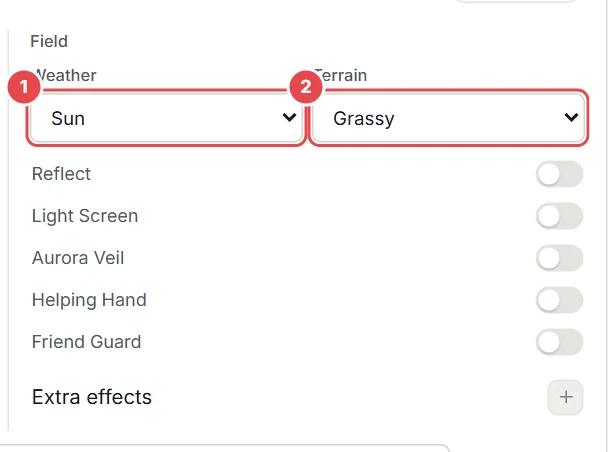
- Weather: Charizard-Mega-Y with Drought selects Sun on its own.
- Terrain: Rillaboom (Grassy Surge, yours) selects Grassy on its own.
- auto: lists the Extra effects that an ability switched on (here Fairy Aura, Ruin abilities...).
- When a Pokémon of the card has Drought, Drizzle, Sand Stream, Snow Warning, Orichalcum Pulse, Grassy/Electric/Psychic/Misty Surge or Hadron Engine, the dropdown selects the effect for you, as if you had chosen it.
- To calculate without it, pick the long dash
—. Your choice is kept even if you change the ability afterwards. - If you pick a different weather by hand, yours wins. If both sides set a weather, the slower Pokémon's one wins by default (it is the one that would still be up).
- Air Lock and Cloud Nine cancel the weather in the calculation, as in the game.
7.2Extra effects
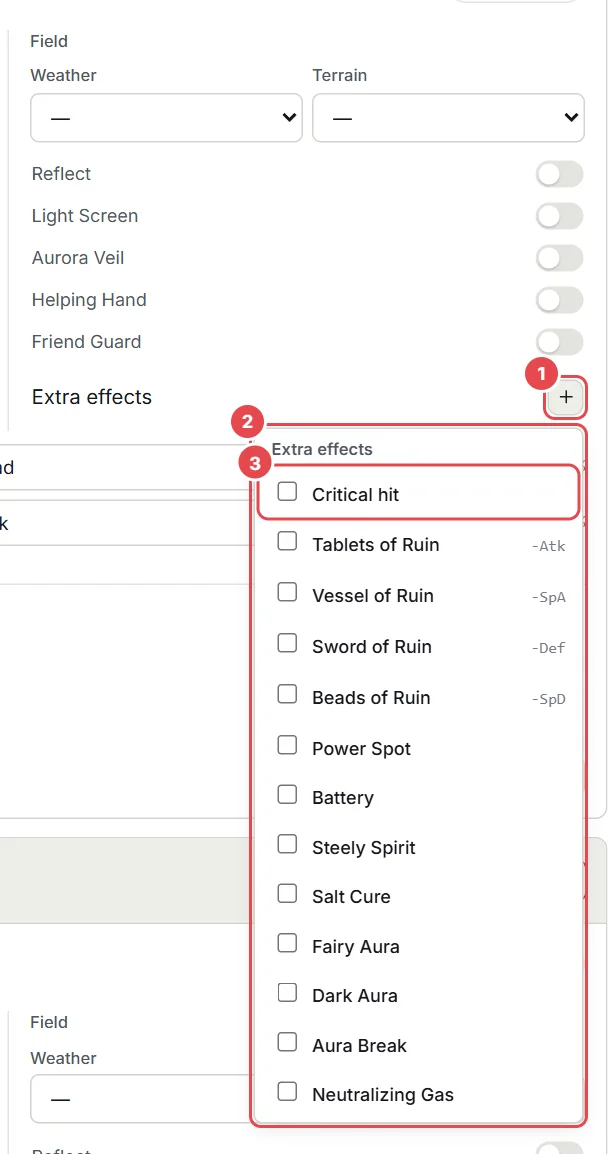
- + button next to "Extra effects" opens the menu; it is highlighted when something is on.
- The menu with every extra effect.
- Each row has a checkbox; an auto tag means an ability switched it on and you can turn it off (for example if that Pokémon would faint first).
| Effect | What it does |
|---|---|
| Critical hit | Every hit of this constraint's move is a critical hit. |
| Tablets / Vessel / Sword / Beads of Ruin | Lower Atk / SpA / Def / SpD of every other Pokémon (auto from the ability). |
| Fairy Aura / Dark Aura / Aura Break | Boost or weaken Fairy and Dark moves (auto from the ability). |
| Neutralizing Gas | Cancels the abilities of both Pokémon (auto from the ability). |
| Power Spot, Battery, Steely Spirit | An ally boosts the attack (x1.3, special x1.3, Steel x1.5). |
| Salt Cure | Marks the target as salted (the calculator flag for Salt Cure). |
Effects that the calculation engine has no flag for (Commander, Ingrain, Charge, Aqua Ring, Binding...) are not offered, because a checkbox for them would do nothing.
8Attack: knocking things out
Add a defending opponent, describe it and choose your move. EvSolver invests in the attacking stat that the KO needs.
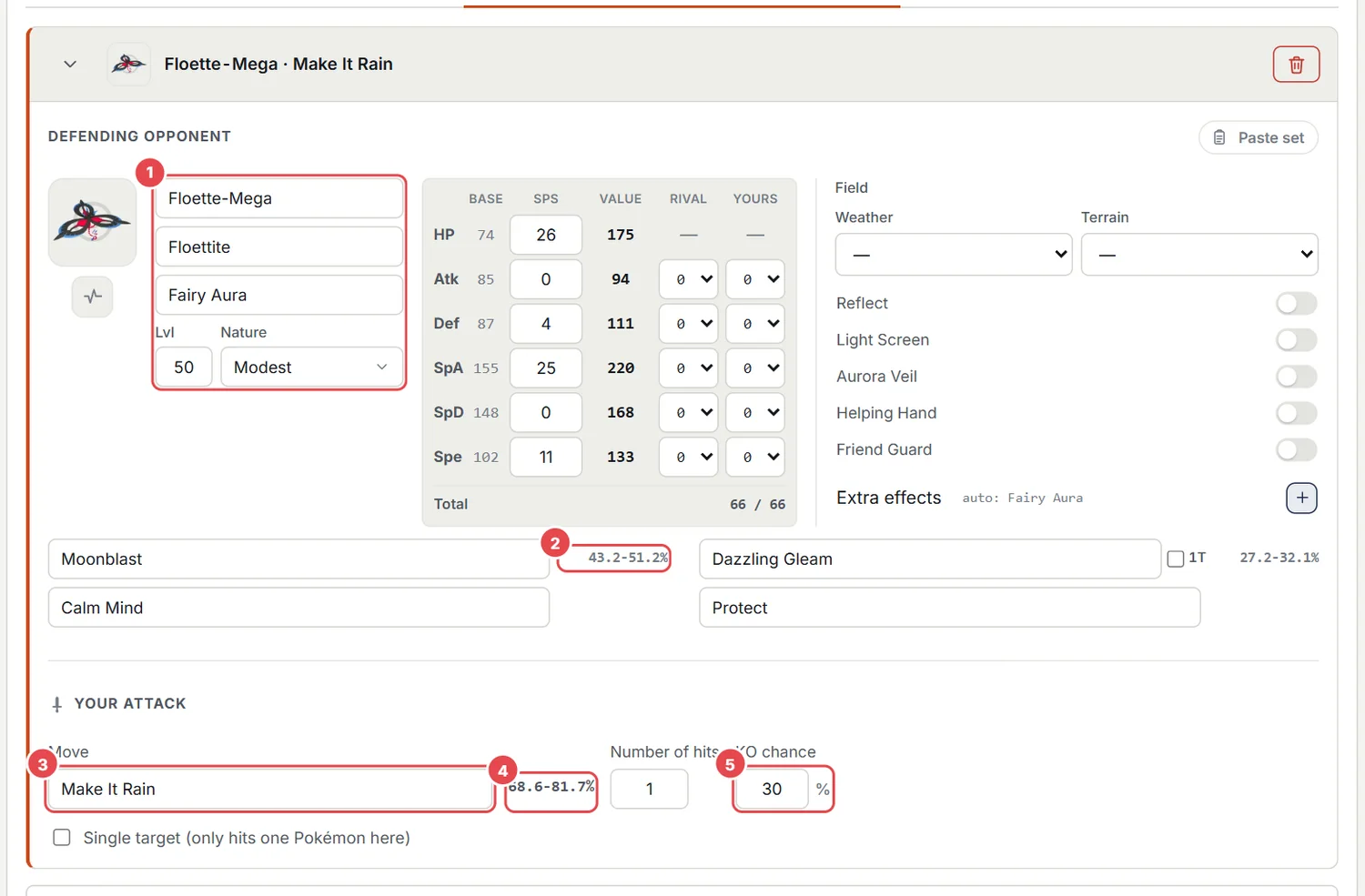
- Defender (paste, species, item, ability, nature, stats with boost columns).
- The rival's moves with the damage they do to you, just like in Defense.
- Your move (type it or use the autocomplete).
- Damage of your move against this defender with your current spread (click to copy).
- KO chance: the minimum probability you require (100 % = guaranteed).
- Number of hits: 1 for an OHKO, 2 for a 2HKO... The rolls of each hit are combined.
- KO chance %: 100 asks for a guaranteed KO; 50 accepts a coin flip. A lower requirement is cheaper.
- Tera (EV system): mark your Pokémon as Terastallized for this KO.
- Critical hit and Single target work as in Defense.
- The rival's Focus Sash, Sturdy, berries, Leftovers... are applied to the KO calculation, and a Knock Off of yours removes its item from that hit on.
9Speed
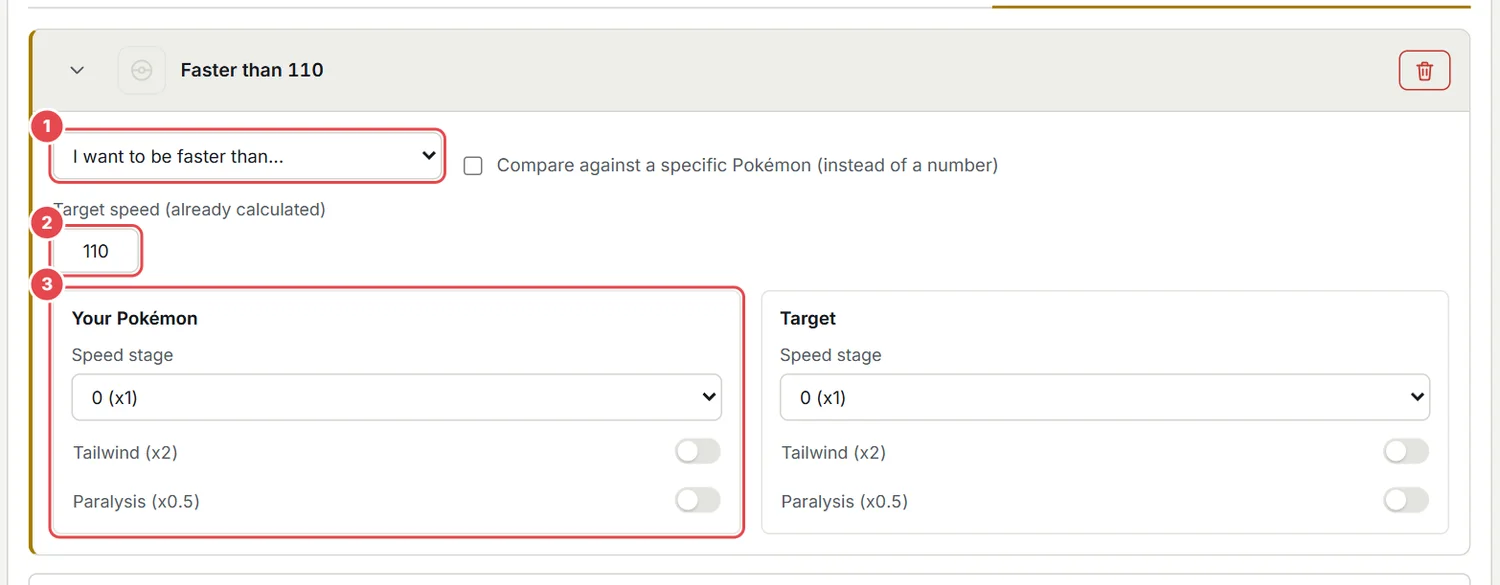
- Mode: Outspeed or Underspeed.
- Reference: a number (for example 135) or, with "Compare against a specific Pokémon", a full Pokémon whose real Speed is used.
- Speed modifiers for each side: stage (-6 to +6), Tailwind (x2) and paralysis (x0.5).
- Choice Scarf is detected from the item and applies x1.5 on its own.
- The stage is applied first (+1 = x1.5, -1 = x0.67) and rounded down; Scarf, Tailwind and paralysis are then chained into one modifier and rounded down again, as in the game.
- Underspeed is used for Trick Room: it caps your Speed. EvSolver picks a slower nature when that is cheaper.
- A speed window (at least X but below Y) is simply two Speed constraints.
10Calculating and reading the results
Press Calculate (a big search runs in the background: the button shows its progress and a Cancel button stops it, so the page never freezes). EvSolver tries every nature (or only yours), finds for each the cheapest investment that satisfies all the constraints, and verifies every candidate against all of them.
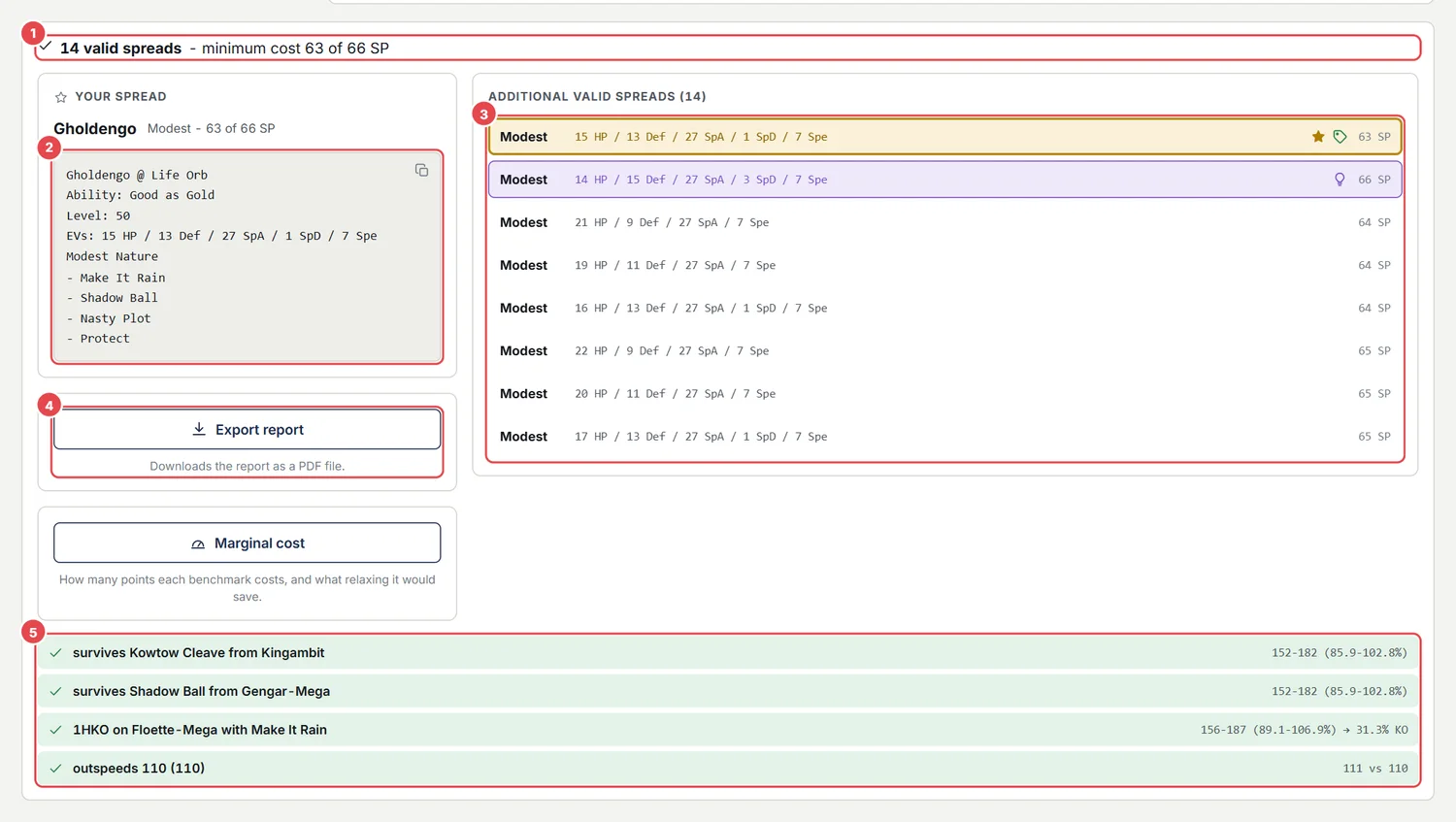
- Summary: number of valid spreads and the minimum cost.
- Your spread: the selected spread as a Showdown paste. Click the box to copy it.
- Valid spreads: click one to select it; the paste on the left updates.
- Export: downloads the PDF report.
- Checks: how the selected spread performs against each constraint (damage range and KO chance).
10.1The star, the lowest cost and the bulb
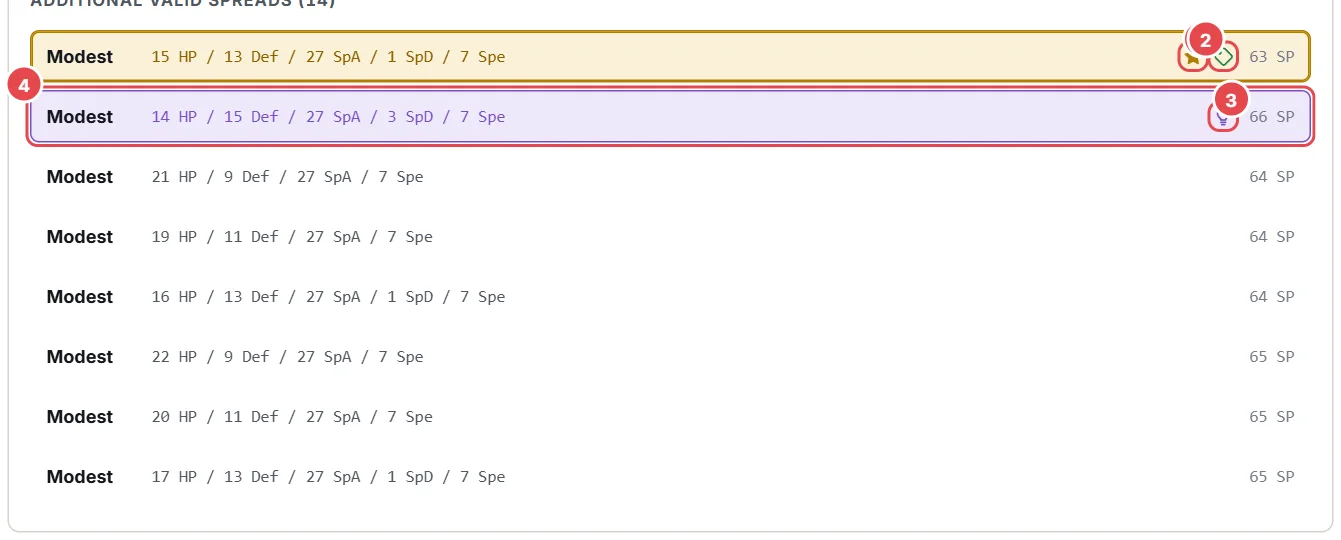
- Star: the recommended spread: the best nature for your set among the cheapest spreads (a small cost tolerance is allowed).
- Price tag: the lowest cost spread, the cheapest one that satisfies everything. The note under "Your spread" tells you how much the recommendation costs on top. The icons sit to the left of the cost.
- Bulb: the best spread for your HP tuning (Leftovers, Sitrus, Life Orb...). It only appears when HP tuning is on.
- A highlighted row is the selected one.
The recommended nature is chosen with simple rules: raising a stat your moves use is good, raising Speed is good when there is a Speed benchmark, and never giving up the attacking stat your Pokémon relies on. Defenses are always considered needed, unless the Pokémon is a real mixed attacker. A special attacker will not be recommended a -SpA nature such as Jolly, even if it were the cheapest.
Natures that lower Defense or Special Defense are never recommended, and they are hidden from the list, because a Pokémon that is not a real mixed attacker never wants them (for example Rash on a special attacker when Modest costs the same). A mixed attacker needs at least two damaging moves of each category and similar base attacking stats; a single stray physical move is just coverage. When some natures are hidden, the list has a Show all natures (N hidden) switch. A nature you fix yourself is always respected.
10.2When there is no solution
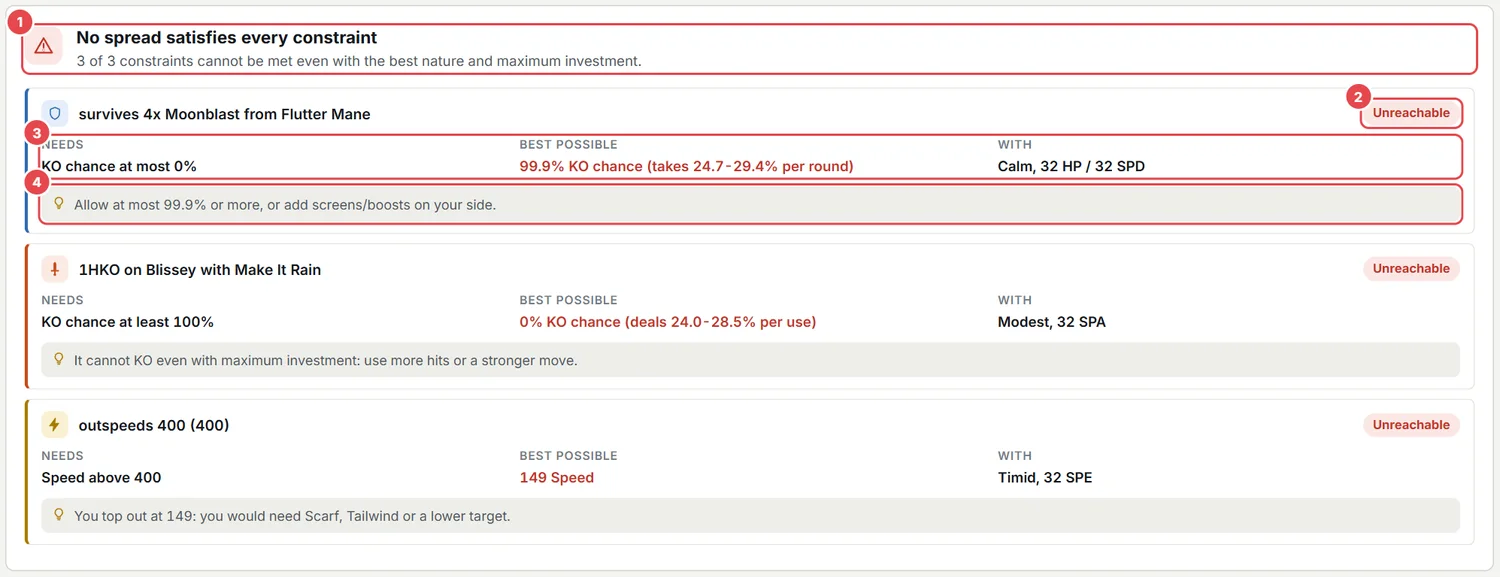
- Summary: how many constraints cannot be met, or whether the problem is the budget or a conflict.
- Unreachable: this constraint cannot be met even with the best nature and full investment.
- Needs / Best possible / With: what is required, the best you can achieve (for example "43.8 % KO chance") and with which nature and points.
- Suggestion: what to change (accept a higher KO tolerance, use more hits...).
If every constraint is reachable alone, the panel shows the cost of each one on its own, split by stat when it uses more than one (for example 3 HP + 27 Def), and which single constraint you could remove to make the rest feasible.
10.3Marginal cost
It lives next to Export report, in the results panel: it only makes sense once you already have a spread to look at, so it is not shown before you Calculate.
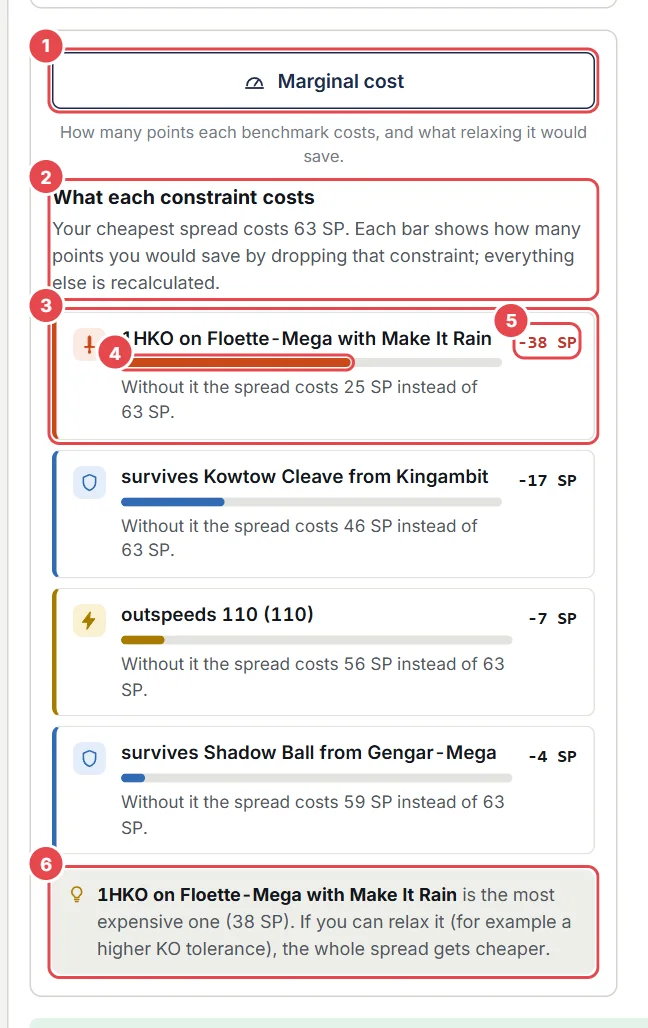
- Marginal cost button.
- Summary: what your cheapest spread costs.
- One row per constraint, coloured by type (Defense, Attack, Speed), most expensive first, with a plain sentence such as "Without it the spread costs 25 SP instead of 63 SP".
- The bar is the share of the total cost that this constraint is responsible for.
- The value: the points you would save by dropping it (
-38 SP), orfreeif it costs nothing extra because the other constraints already cover it. - Tip: names the most expensive constraint, the one worth relaxing first.
It re-runs the search without each constraint in turn. Use it to see which benchmark is expensive and relax only that one (for example a higher KO tolerance) instead of removing things blindly. When there is no solution, the same panel shows which single constraint would make one appear, and at what cost.
10.4History
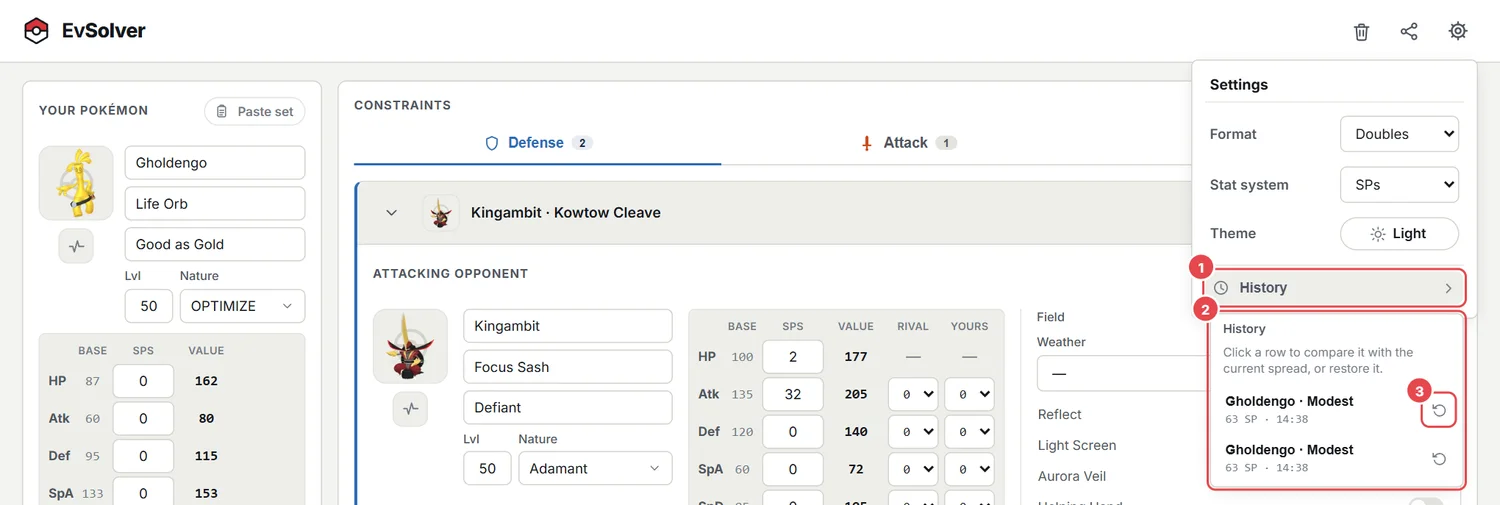
- The clock button, inside Settings.
- The list of your recent calculations. Click one to compare it with the current spread; the compare card has a cross to stop comparing.
- The Restore icon: brings back that whole Pokémon and its constraints.
The history only lives in the open page (it is not saved between visits, and it is cleared on reload): click a past calculation to compare its stats with the current spread, or press its Restore icon to bring back that whole Pokémon and its constraints, with Undo for a few seconds.
10.5Sharing a calculation
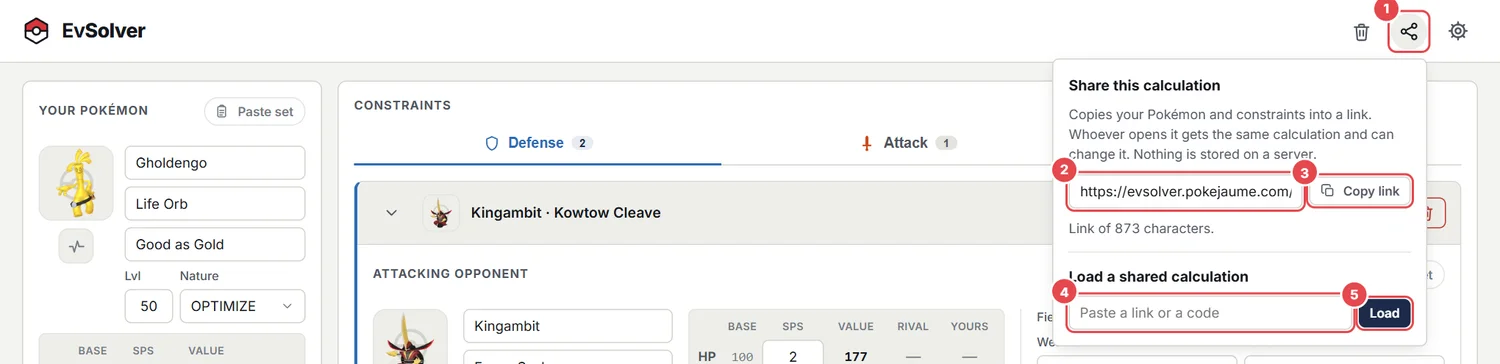
- The share button, in the top-right corner.
- The link to your calculation: your Pokémon, the constraints, the format and the stat system.
- Copy link.
- To open a calculation somebody sent you, paste the link (or just the code that starts with
SS1) here. - Load.
Whoever opens the link sees exactly what you had and the calculation runs by itself; they can change anything. Loading a shared calculation replaces the current team, but the page offers an Undo for a few seconds. The link is a few hundred characters long (longer the more constraints you add), and nothing is stored on a server: the whole calculation travels inside the link itself, and only the inputs are shared, not the results.
11The PDF report
The Export report button downloads a PDF with everything about the selected spread. It is generated in your browser (no upload) and works even if you open the app from a file.
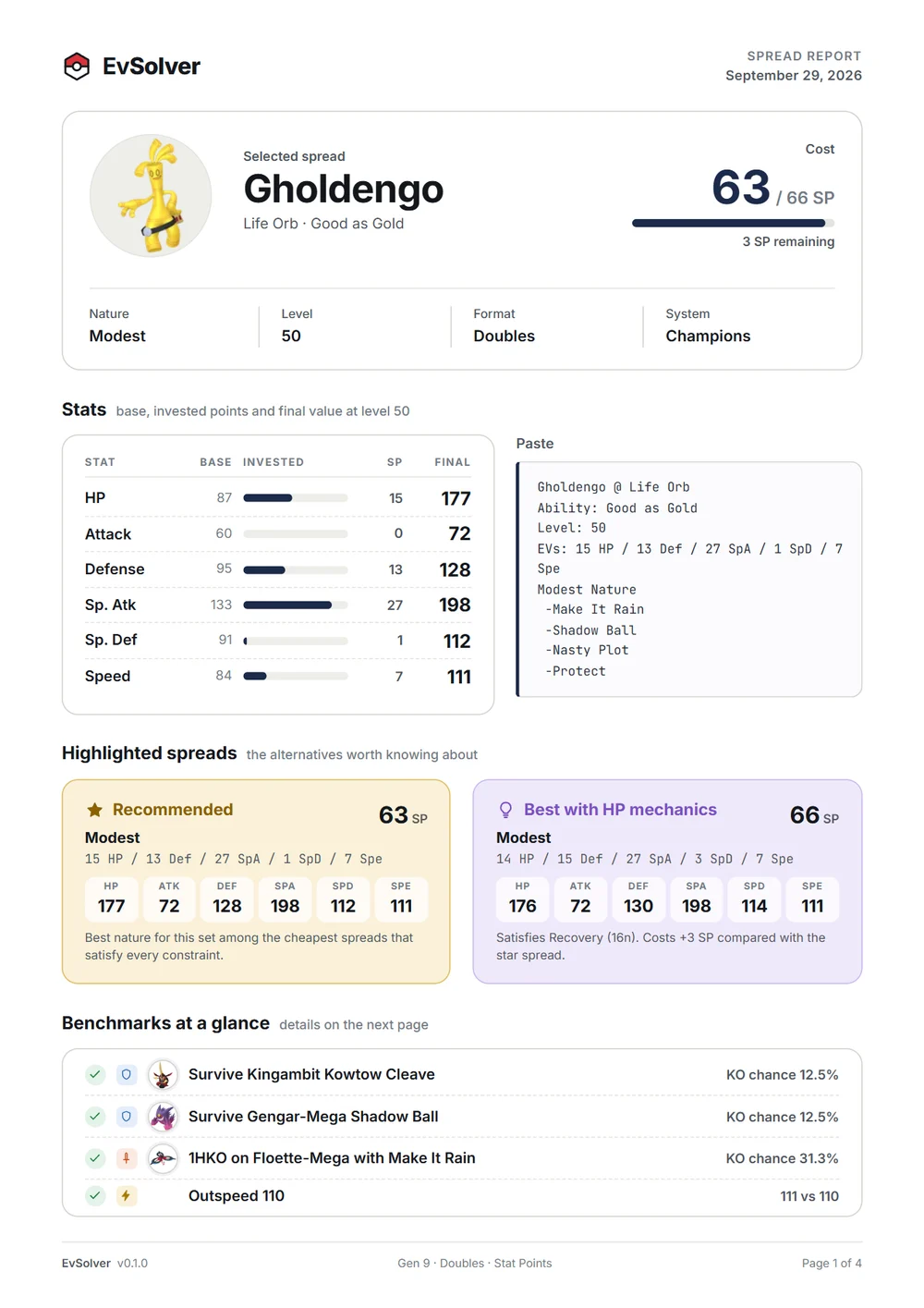
- The first page: the selected spread, its cost and stats, the paste, the highlighted spreads and the benchmarks at a glance. If there are many benchmarks, only as many rows as fit are shown here and the rest continue on the next pages.
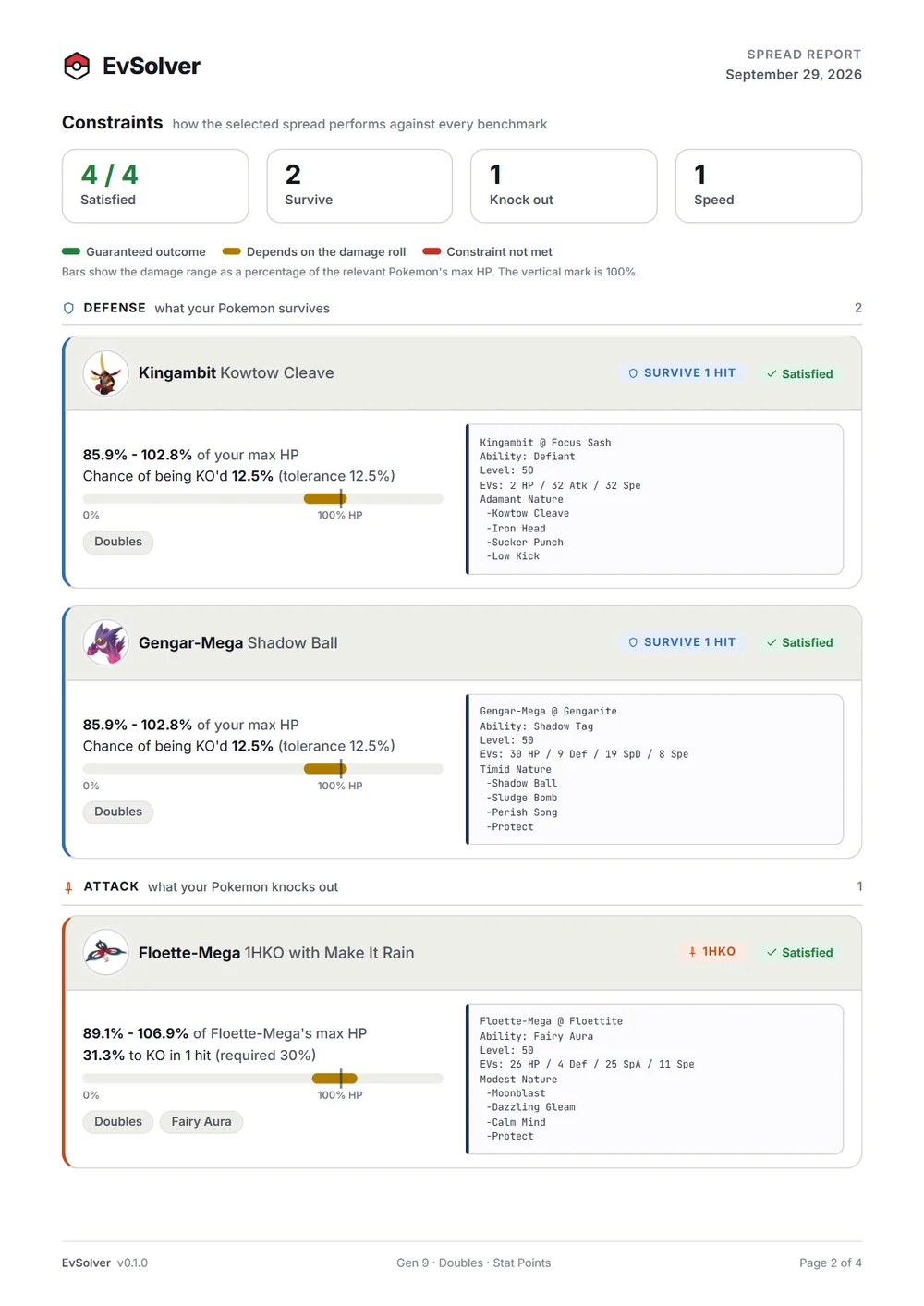
- Constraints: each benchmark with the damage range as a bar, the KO chance, the required tolerance and the rival's paste.
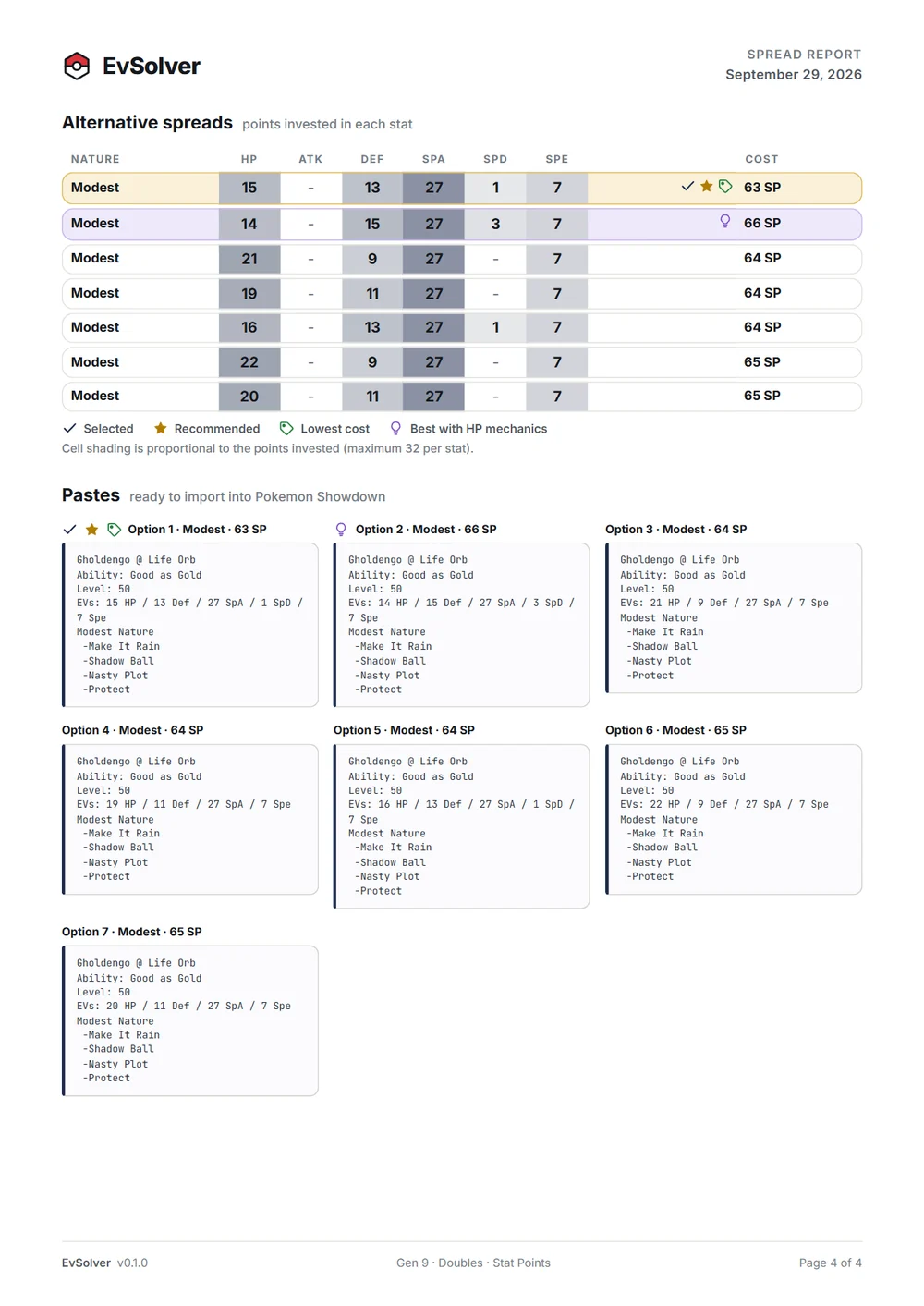
- Alternatives: a table of spreads with cell shading proportional to the points, tagged Selected, Recommended, Lowest cost and HP mechanics, plus pastes ready to import into Showdown.
Every benchmark says how many hits it needs: a knock out reads 2HKO ("100.0% to KO in 2 hits"), a defensive one reads Survive 2 hits (plus the Protect turns, if any) and "Chance of being KO'd". On the constraint pages, benchmarks are grouped under Defense, Attack and Speed headings, and on the first page each row has a small shield, sword or bolt icon. Under each benchmark, small tags list everything that changes the numbers: stat changes (Rival +2 Atk, Yours -1 Def), weather and terrain, screens, Helping Hand, critical hits, and effects that switch on by themselves through an ability, such as Fairy Aura or Sword of Ruin. Stat changes that the calculation applies on its own are listed too, with their cause: a terrain seed (Yours +1 Def (Electric Seed)), Intimidate (Yours -1 Atk (Intimidate), or +1 with Defiant), Download, Intrepid Sword... Only the ones that matter for the damage of that benchmark appear. The header of the first page also shows how many points are still remaining; they can be spent anywhere without breaking any benchmark.
The file is named after your Pokémon, the nature and the date. The version of EvSolver appears in the footer of every page.
12How it works
Damage does not depend on your points but on your final stats, and at level 50 there are only about 33 different values per stat. That makes an exact search practical.
- For every nature (or the one you fixed) the app lists the breakpoints of each stat: the investments that actually change the final value.
- Speed and offensive benchmarks come first, because they are hard floors: it finds the minimum points that satisfy them.
- For every HP breakpoint it finds the cheapest Def and SpD that clear all the bulk benchmarks.
- Every candidate is verified against all constraints with the real calculator, which also covers moves whose damage depends on other stats (Body Press, Foul Play, Gyro Ball...).
- Finally it picks the recommended spread and the HP-tuning alternative.
12.1What the calculation takes into account
- Items and abilities that change damage (Life Orb, Choice items, Assault Vest, Eviolite, resist berries, Intimidate, Protosynthesis...) and the Champions-only abilities.
- Focus Sash and Sturdy: the first lethal hit leaves 1 HP.
- Sitrus / Oran Berry: healing when HP drops to half or less, at the exact moment.
- End-of-turn recovery and damage: Leftovers, Black Sludge, weather, Grassy Terrain, burn, poison, toxic (it escalates), Poison Heal.
- Consumable items: a resist berry only reduces the first hit; Air Balloon pops on the first hit; Knock Off removes the item from that hit on.
- Status conditions, stat stages, Tera, screens, Friend Guard, weather, terrain and spread-move reduction.
12.2KO chance
A move has 16 possible damage rolls. For a single hit, the KO chance is the fraction of rolls that kill. For several hits or several attackers, the exact probability is computed by combining the rolls. Your tolerance is compared with that number.
Limitations: critical hits are not part of the probability unless you tick the option; there are no usage weights; and effects with no calculator support (Commander, Ingrain...) are not modelled. Contrast important results with another calculator.
13Worked examples
13.11. A defensive spread that survives two attackers
- Paste your Pokémon and leave the nature on OPTIMIZE.
- Defense tab: add the first attacker, click the circle next to its move, KO tolerance 0 %.
- Add a second attacker in its own card (they are independent constraints), or use Add focus fire if they attack in the same turn.
- Calculate. If it costs too much, press Marginal cost and relax the most expensive one.
13.22. Leftovers and Protect
- Set your item to Leftovers; the HP tuning bulb suggests + Recovery 16n: click it.
- In the Defense card choose the move, set Hits to survive = 2 and Protect turns = 1.
- Calculate: the recovery of two turns is counted before the second hit, and the bulb spread wastes no HP.
13.33. A speed benchmark with a nature trade-off
- Speed tab: add a Speed reference (for example outspeed 135).
- Add an Attack constraint for the KO you need.
- The recommendation keeps the attacking stat and, if the Speed benchmark allows it, picks the nature that raises it.
13.44. Weather from the ability
- Select the rival Charizard-Mega-Y: the card selects Sun by itself.
- To see how much the weather matters, change the dropdown to the long dash and watch the percentages.
14Using it on your phone

- The layout becomes a single column: your Pokémon on top, then the constraints and the results.
- The header keeps everything on one row.
- The four moves of a rival are a single column; the percentage is at the right of each one.
- "Add attacking opponent" and "Add focus fire" are stacked at full width.
- The PDF report is generated and downloaded on the phone as well.
15Questions and answers
Why does it say "No spread satisfies every constraint"?
Some constraint is impossible alone, or together they need more than the budget or conflict on the nature. The panel shows the best you can reach for each impossible one and what to change.
What is the difference between the star and the lowest cost?
The lowest cost is the cheapest spread. The star is the best nature for your set among the cheapest spreads (allowing a couple of points more). If the star is not the cheapest, the note under "Your spread" says how much more it costs.
Why is there no Tera in SP mode?
Terastallization does not exist in Pokémon Champions, so the option only appears in the EV system.
Are my teams sent anywhere?
No. Everything is calculated in your browser and saved only in its local storage.
Why does the percentage on screen differ by 0.1 from the copied calc?
The library rounds the text down while the screen rounds normally.
Can I use it offline or open it from a file?
Yes. The PDF works too; only the sprites in the PDF need the site to be served from the web.
A move is red. Is it illegal?
It is a soft warning that the species does not learn it in the known data. Events and Champions-only sources can make it legal.
How do I remove a weather that an ability sets?
Choose the long dash — in the Weather or Terrain dropdown.
Which browsers work?
Current Chrome, Edge, Firefox and Safari, on desktop and phone.
16About, credits and feedback
- Damage engine: @smogon/calc and data from Pokémon Showdown; sprites from PokeAPI.
- Found a wrong calculation, a missing move or an idea? Send it with the sets and the constraints you used, and the reference you compared against.
- Pokémon and its characters are trademarks of Nintendo, Creatures Inc. and GAME FREAK inc. EvSolver is a non-commercial fan tool.
16.1Thanks to the testers
EvSolver got better with every bug they found and every idea they gave. Thank you for your time, your patience and your honest feedback:
AvalosJaborro95EstebanMMTroncitoAbnaaDestr0FCarmona17Novinho_3Peprayo25AdoemarpaFabianJPP16xurxeteeMaish